
How to Choose a Gem Wisely


Imagine this scenario: a developer added a pub/sub gem built on top of Sidekiq to handle background event broadcasting in your company’s Rails app. At the time, it was a huge win: instead of building a custom job orchestration system, they could drop in the gem, wire up a few events, and ship a feature in days instead of weeks.
Fast forward a few years: Sidekiq needed an update. You find out the gem wasn’t actively maintained anymore. But by then, the entire application depended on it. Core features like sending notifications, syncing with third-party APIs, and triggering billing logic all ran through this pub/sub layer.
Now you face a painful choice: either keep running on an unmaintained gem and risk breakage every time Sidekiq or Rails is updated, or rip it out and refactor the app to use a supported approach.
What began as a new dependency to save time has turned into a critical piece of fragile infrastructure. The lack of maintenance has turned what should have been a simple dependency update into a full-blown project.
How do we avoid getting into this situation in the first place? In this post, we’ll show you by digging into five critical areas to check before you choose a new gem.
When working with Ruby on Rails, it’s tempting to install a gem for every new feature. Gems are one of the best parts of the Ruby ecosystem.
They save time, bring in expertise from the community, and help teams deliver quickly. But gems are also long-term commitments. Every gem you add becomes part of your application’s foundation, for better or worse.
At our company, we focus on fixed-cost Ruby and Rails maintenance . A big part of that work involves keeping an eye on gems: their security, their stability, and whether they still make sense for the app.
Here are the areas we check when deciding whether to keep a gem: how well the gem has been maintained and whether it’s active, the community surrounding it and how well it’s known, its licensing, its security, and its overall fit.
Do You Even Need a Gem?
The five areas below help you size up a gem you’re planning to adopt. But sometimes the leanest, safest dependency is the one you never add, so start with a more basic question: do you actually need this gem, or could you write the few lines it would take yourself?
Mike Perham, the author of Sidekiq, makes this point well in Kill Your Dependencies :
Every dependency in your application has the potential to bloat your app, to destabilize your app, to inject odd behavior via monkeypatching or buggy native code.
Whether owning it yourself wins out depends on how much code it would take and how many edge cases you’d have to handle.
A small string helper or a thin wrapper around a single HTTP call is often a few lines you can own outright, with no maintenance, security, or licensing tail to worry about.
A PDF renderer or a full OAuth flow is the opposite: enough edge cases that a well-maintained gem is the smarter bet. The line moves with your app, but it’s worth drawing every time. Before you reach for the Gemfile, definitely consider whether you can implement the minimal functionality yourself and skip the dependency entirely.
Here is the whole decision in one view, from “do I really need it?” all the way to “add it and keep an eye on it”:
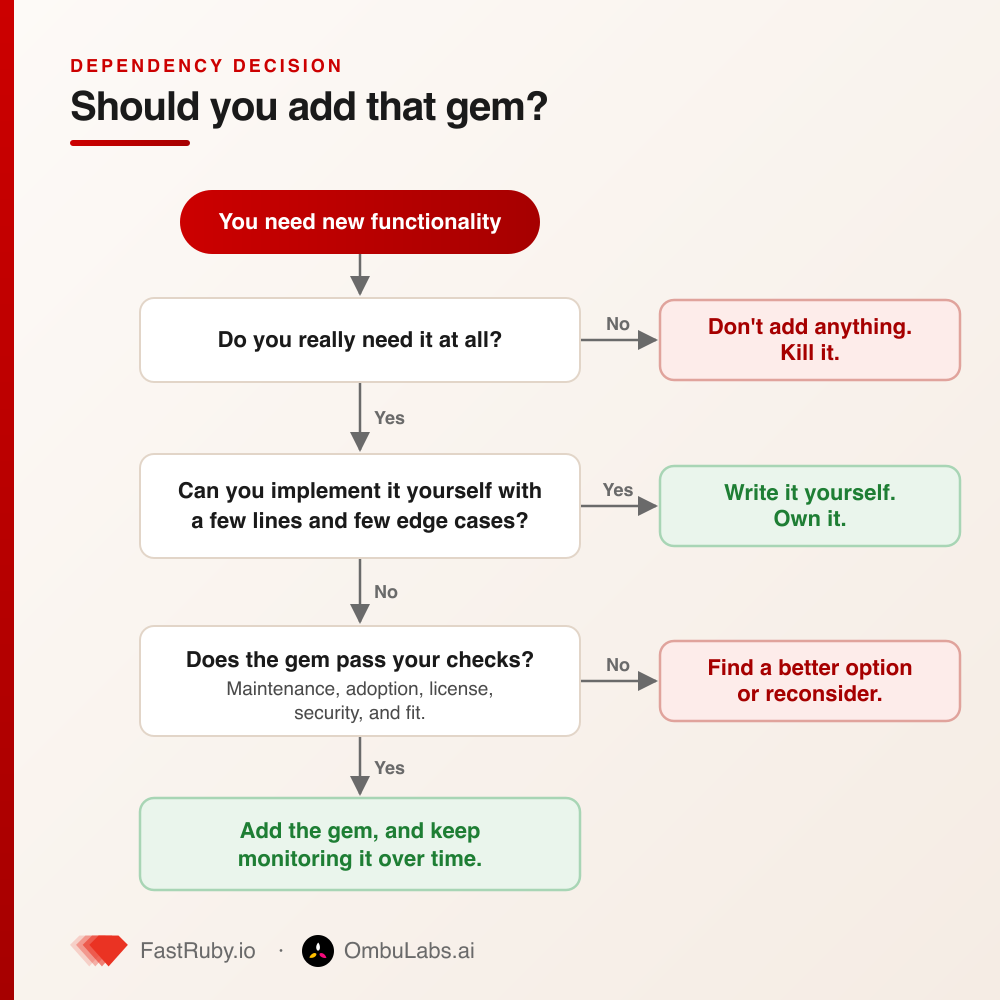
The rest of this post breaks down that last question, the checks we run before we trust a gem.
1. Maintenance and Activity
The biggest thing to look for is whether your new dependency is maintained. An abandoned gem may work today but become a roadblock tomorrow when Ruby or Rails versions move forward.
Here are a few metrics to watch:
-
Last release date: Check how recently the gem was updated. A project that hasn’t seen a release in years may no longer be compatible with modern Ruby versions. For example, many gems built for Ruby 2.x break on Ruby 3.x because of the breaking changes between those versions.
-
Commit history: A steady stream of commits, even small ones, shows that the project is still alive. In contrast, a repo with one commit in the past two years likely means the maintainers have moved on.
-
Open issues and pull requests: A backlog of unresolved issues can be a red flag. If critical bugs linger without maintainer response, you may end up maintaining the gem yourself. On the other hand, active triaging and merged pull requests signal a healthy project.
For gems you already depend on, bundle outdated gives you a quick snapshot of how far behind you are, and
gem list --remote <name> shows the available versions and their release dates. We dug into this across some of the most
popular gems in the ecosystem in
How outdated are these popular Ruby projects? ,
and the results were surprising even to us.
2. Community and Adoption
Again, these aren’t perfect metrics, but they can help you gauge whether your gem will be maintainable in the long term.
-
Downloads and stars: These metrics indicate how widely the gem is used and trusted. A gem with millions of downloads or thousands of GitHub stars is less likely to vanish overnight.
-
Ecosystem mentions: Does the gem appear in blogs, tutorials, or other projects? Broad adoption usually means more eyes on the code, quicker bug reports, and shared knowledge on how to use it.
-
Forks and contributors: A project with multiple active contributors is less dependent on a single maintainer. If one person drops out, others can keep it alive. A gem with a single owner and no active forks is far more fragile.
Where do you find these numbers? The gem’s page on RubyGems.org shows total and recent downloads, Libraries.io gives each project a SourceRank score based on its adoption and maintenance signals, and a repository’s GitHub “Insights” tab shows the commit and contributor activity over time. None of these is decisive on its own, but together they paint a picture.
3. Licensing
Licensing may not be glamorous, but it can have real consequences.
- Open source license: Always check the license to ensure it’s compatible with your project. Most gems use permissive licenses like MIT, which are fine for commercial use. But occasionally you’ll find more restrictive licenses (like GPL) that could create legal hurdles for commercial projects. Knowing this up front saves pain later.
If you want to audit the whole dependency tree instead of one gem at a time, the license_finder gem scans your bundle, lists the license of every dependency, and lets you whitelist the ones your organization has approved so a surprise GPL transitive dependency fails your build instead of your legal review.
4. Security
When adding a gem to your Rails application, you’re not just trusting the code you see, you’re also trusting the maintainer’s track record and the entire dependency chain that comes with it.
- Vulnerability reports: Before adopting a gem, check for known security issues in sources like the Ruby Advisory Database or CVE listings.
The easiest way to do this is to run bundler-audit against your project (bundle-audit check --update), which
cross-references your Gemfile.lock against that same advisory database and flags any vulnerable versions.
Just as important: look at how quickly those issues were patched. For example, Nokogiri , one of the most widely used gems in Rails apps, has had several high-profile security issues over the years. But it’s also an excellent case study in good maintenance: the team consistently issues patches quickly, often within days. That responsiveness makes it a safe choice despite past vulnerabilities.
-
Dependency chain: Gems often depend on other gems, which may in turn depend on others. This creates a web of transitive dependencies, each one potentially carrying risks. For instance, using OmniAuth can bring in multiple third-party strategies as sub-gems, some maintained better than others. Without oversight, one poorly maintained dependency could expose the entire authentication flow to risk. A regular maintenance process ensures these dependencies are reviewed, patched, or swapped out before they become liabilities.
-
Supply chain risk: The maintainer’s account is part of the attack surface too. A gem with a single owner, no two-factor authentication, and the ability to push directly to RubyGems is one compromised credential away from shipping malicious code to everyone who depends on it. We covered several real examples and how to defend against them in The Hidden Dangers in Your Gemfile: Supply Chain Attacks in RubyGems .
If you want to go further, Brakeman and the rest of the essential Ruby security tools we rely on can catch issues that a gem introduces into your own application code.
5. Stability and Fit
Even if a gem is secure, it has to be the right fit for your application. Stability, maturity, and alignment with your actual needs all play a role in making that judgment.
- API maturity: A gem that changes its API with every minor release can create constant churn in your codebase. Look for signs of maturity such as semantic versioning, a predictable release cadence, and clear deprecation policies.
A quick read of the CHANGELOG tells you a lot here: are breaking changes called out clearly, or do they show up unannounced in patch releases? For example,
Devise has been around for years, with a mature API and strong community support. You can rely on it for
authentication without fearing constant breaking changes. In contrast, newer authentication gems might be moving fast but lack the stability you need in production.
-
Documentation and tests: Good documentation isn’t just about developer convenience; it’s a marker of quality and maintainability. Similarly, a gem with a comprehensive test suite signals that the maintainers care about stability and regression safety. RSpec is a great example: its extensive docs and test coverage make it a reliable foundation for testing, even in large, complex applications.
-
Alignment with your needs: Pulling in a massive gem when you only need one small feature is like renting a moving truck just to carry a single box. The overhead in maintenance and potential vulnerabilities rarely pays off. For example, developers often reach for RailsAdmin or ActiveAdmin when they only need a very basic admin interface.
Those gems are powerful, but they’re also heavy, with lots of dependencies and DSL conventions. In many cases, building a few CRUD screens with plain Rails is safer, lighter, and more maintainable.
A quick gem-vetting checklist
Before you add gem "shiny_new_thing" to your Gemfile, run through this:
- ✅ Has it had a release in the last year, with a steady commit history?
- ✅ Are issues and pull requests being triaged, or is there a graveyard of stale ones?
- ✅ Does the download count and contributor list suggest it will outlive its original author?
- ✅ Is the license compatible with your project? (
license_findercan confirm.) - ✅ Does
bundle-auditcome back clean, and does the team patch vulnerabilities quickly? - ✅ Does it follow semantic versioning with a readable
CHANGELOG? - ✅ Is it the right size for the job, or are you renting a moving truck to carry one box?
If a gem clears all seven, it is a much safer bet for the long term.
Conclusion
Adding a gem may feel like a shortcut today, but every gem becomes part of your app’s long-term health. By considering maintenance, community, licensing, security, and fit, you can make smarter choices that reduce risks and avoid painful migrations later.
And if you don’t have time to review every gem, or if your app already relies on dozens of them, that’s where we can help.
Our fixed-cost Rails maintenance service keeps your dependencies updated, identifies risks before they become roadblocks, and ensures your application stays secure, stable, and fit for the future.
Want peace of mind about your Rails app’s gem ecosystem? Let’s talk .