
Our Rails Upgrade Methodology as Claude Skills

For more than 8 years, we have been publishing detailed guides on how to upgrade Rails applications.
We have documented every minor version from Rails 2.3 through 8.1 in our Rails Upgrade Series and distilled our methodology into an ebook: The Complete Guide to Upgrade Rails
All of that knowledge comes from more than 60,000 developer-hours of hands-on upgrade work for companies of all sizes, from solo-founded SaaS products to huge Rails monoliths running at Fortune 500 public companies.
Today, we are making that methodology available to everyone as an open source Claude Code Skill : claude-code_rails-upgrade-skill .
Why a Claude Code Skill?
Claude Code is a powerful AI assistant for software engineering. It can read your codebase, run commands, and propose changes.
However, when it comes to Rails upgrades, general programming intelligence is not enough. It can lead you down the wrong path.
A Rails upgrade is not just about fixing deprecation warnings and updating gem versions.
It requires a battle-tested methodology: a sequence of steps, a testing strategy, and a set of opinions about how to manage risk during the upgrade.
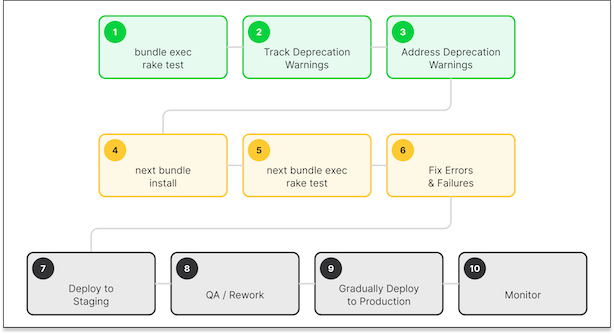
Without that structure, even the most capable AI will take shortcuts that create problems down the road.
That is why we built this skill and made it open source.
It gives Claude Code the methodology and domain knowledge it needs to guide you through a Rails upgrade the FastRuby.io way.
Our teams have already made all the judgment calls that are included in the methodology, so that you don’t have to delegate those calls to Claude.
Why Open Source?
We believe that the Rails community benefits when upgrade knowledge is widely accessible. We have always shared our learnings through blog posts, conference talks and workshops, and open source tools like next_rails and Skunk .
Open sourcing this skill is the natural next step.
If you have the time and confidence to upgrade your Rails application yourself, this skill will guide you through it with the same methodology we use with our clients.
Of course, if you would rather have us handle it, our fixed-cost, monthly maintenance service and upgrade services are always available. I know many leaders in the industry prefer to have their engineering teams focus on their product roadmap instead of Rails upgrades.
What Makes This Skill Opinionated
This is not a generic “help me upgrade Rails” prompt. It encodes specific opinions that we have developed over hundreds of upgrade projects.
It Always Uses Dual Booting
The skill will always set up dual booting for your upgrade project.
This means your application runs with both the current and target versions of Rails simultaneously during the upgrade project.
Claude Code on its own does not know that dual booting is worth the effort. From a pure code perspective, if we didn’t extend it with a skill, it would advise against this technique because it adds conditionals everywhere:
if NextRails.next?
  # Code for the TARGET version (new behavior)
else
  # Code for the CURRENT version (old behavior)
end
While it does add many conditionals to your codebase, it’s worth it. Claude will say that it is unnecessary complexity. Our teams have learned from experience that dual booting is essential for debugging, testing, and even gradual deployments to production
Dual booting lets you:
- Run your test suite against both Rails versions in CI
- Catch compatibility issues early instead of discovering them after a risky big-bang deploy
- Clean up all the conditionals in one pass after the upgrade is complete
- Quickly debug between two versions of Rails by setting/unsetting the BUNDLE_GEMFILE environment variable
Run the test suite (models only) with the current Rails version:
bundle exec rspec spec/models
Then run the test suite with the target Rails version:
BUNDLE_GEMFILE=Gemfile.next bundle exec rspec spec/models
Combined with byebug or debugger it can be a powerful tool for understanding the internal changes
that happened in Rails that are causing thorny issues in your upgrade project.
It Runs the Test Suite Constantly
The skill requires your test suite to pass before any upgrade work begins. Then it runs tests against both the current and target Rails versions throughout the process.
Every change is verified against both versions.
This is non-negotiable. An upgrade without test coverage is a gamble. The skill will block the upgrade and help you fix failing tests before proceeding.
It Sets the Right Defaults First
Before upgrading to a new Rails version, the skill verifies that your config.load_defaults
matches your current Rails version.
If it does not, the skill delegates to our companion skill, rails-load-defaults-skill , to walk through each framework default one at a time, grouped by risk tier.
This is a step that many teams skip, and it causes subtle bugs after the upgrade. Getting your defaults aligned before bumping the Rails version eliminates an entire category of issues.
It Never Skips Versions
The skill enforces sequential upgrades. If you are on Rails 5.2 and want to reach 8.1, it will plan the path: 5.2 -> 6.0 -> 6.1 -> 7.0 -> 7.1 -> 7.2 -> 8.0 -> 8.1.
If you really want to do more than one minor version at a time, you can override our skill by telling Claude what target version you want to upgrade to.
Each hop is completed fully before moving to the next one.
We have seen what happens when teams try to skip versions. The compound breakage is nearly impossible to debug. Sequential upgrades are slower on paper but faster in practice.
How the Three Skills Work Together
The upgrade process involves three open source skills that work in tandem:
The Ruby on Rails Upgrade Skill
This Claude Code skill is the orchestrator. It detects breaking changes, generates upgrade reports, plans the sequential upgrade path, and coordinates the other two skills throughout the process.
You can find the source code for this open source skill under the OmbuLabs.ai organization: github.com/ombulabs/claude-code_rails-upgrade-skill
The Dual Boot Skill
This skill sets up and manages dual-boot environments using the
next_rails gem.
It handles the Gemfile.next setup, teaches Claude Code to write version-dependent code
using NextRails.next?, configures CI to test against both dependency sets, and cleans up
dual-boot code after the upgrade is complete.
While most commonly used for Rails upgrades, it works equally well for upgrading Ruby versions
or any core dependency like sidekiq or devise.
You can find the source code for this open source skill under the OmbuLabs.ai organization: github.com/ombulabs/claude-code_dual-boot-skill
The Rails Defaults Skill
This skill handles the incremental update of config.load_defaults by walking through each framework
config one at a time with tiered risk assessment (low-risk configs first, configs requiring
human review last).
You can find the source code for this open source skill under the OmbuLabs.ai organization: github.com/ombulabs/claude-code_rails-load-defaults-skill
This separation keeps each skill focused and makes them independently useful. You can use the dual-boot skill on its own for any dependency upgrade, or the load-defaults skill by itself to align your framework defaults without doing a full Rails upgrade.
Built on 8+ Years of Published Knowledge
These skills are not just a wrapper around the official Rails upgrade guides.
They incorporate the specific patterns, edge cases, and hard-won lessons from our Rails Upgrade Series , which covers every upgrade path from Rails 2.3 to 8.1.
It also draws from our ebook The Complete Guide to Upgrade Rails , which documents the full FastRuby.io upgrade methodology.
The version-specific guides in the skill include detection patterns for breaking changes, before/after code examples, and difficulty ratings based on what we have seen across hundreds of real-world upgrades.
Installation
Here is a quick guide for installing these skills in your local environment:
# 1. The dual-boot skill
git clone https://github.com/ombulabs/claude-code_dual-boot-skill.git
cp -r claude-code_dual-boot-skill/dual-boot ~/.claude/skills/

# 2. The load-defaults skill
git clone https://github.com/ombulabs/claude-code_rails-load-defaults-skill.git
cp -r claude-code_rails-load-defaults-skill/rails-load-defaults ~/.claude/skills/

# 3. The upgrade skill (depends on the two above)
git clone https://github.com/ombulabs/claude-code_rails-upgrade-skill.git
cp -r claude-code_rails-upgrade-skill/rails-upgrade ~/.claude/skills/
Usage
Navigate to your Rails application directory and fire up Claude Code in your terminal. You will see three new slash commands:
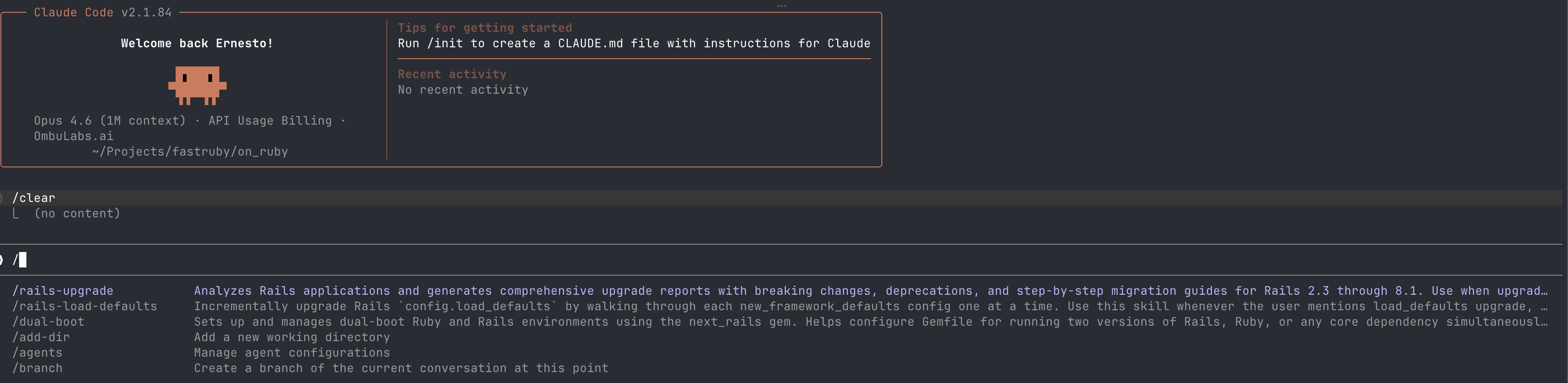
/rails-upgrade– The orchestrator skill to upgrade Rails/rails-load-defaults– Theload_defaultsenforcer/dual-boot– The dual boot skill to set up your project for dual booting
All of these commands can be called with or without an instruction. As a general rule, I recommend you provide some context to the slash command, so that Claude can be more efficient (and less expensive!)
If you call the Rails upgrade skill it will:
- Run your test suite to establish a baseline
- Keep track of deprecation warnings
- Address deprecation warnings
- Verify your
load_defaultsis aligned with your current Rails version - Detect breaking changes in your codebase
- Generate a comprehensive upgrade report with real code examples from your project
- Ask for input on next steps
What’s Next?
I would love to see teams use these skills in their next Ruby or Rails upgrade project. The more people who use it (and extend it!), the more issues we can fix, and the more effective Claude can be at upgrading applications.
If you want to try it, the installation takes less than a minute.
Please give it a try and hit me up on GitHub or Bluesky if you find any problems.
Contributing
We welcome contributions. If you have encountered edge cases in your own upgrades, found incorrect detection patterns, or want to add support for new Rails versions, please open an issue or submit a pull request:
Wrapping Up
AI is changing how we write and maintain software, but it still needs domain expertise to handle complex tasks like Rails upgrades well.
By open sourcing this skill, we are giving the community access to the same methodology we use with our clients, built on 60,000+ hours of real upgrade experience.
If you really don’t have the time to upgrade, I get it. Feel free to reach out, we are always here to help you upgrade Rails . 🚀